
Network
Wi-Fi, wired and VPNs: connect in a keystroke, and edit every setting, from WPA Enterprise to IPv6, DNS and routes. WireGuard and OpenVPN files, a hotspot, passwords in your keyring.

Lituus is the settings app Hyprland doesn’t come with: network, Bluetooth, sound and displays, with the depth of KDE’s settings, in a native app written in Rust. It drives NetworkManager, BlueZ, PipeWire and Hyprland, so their own tools keep working alongside it.





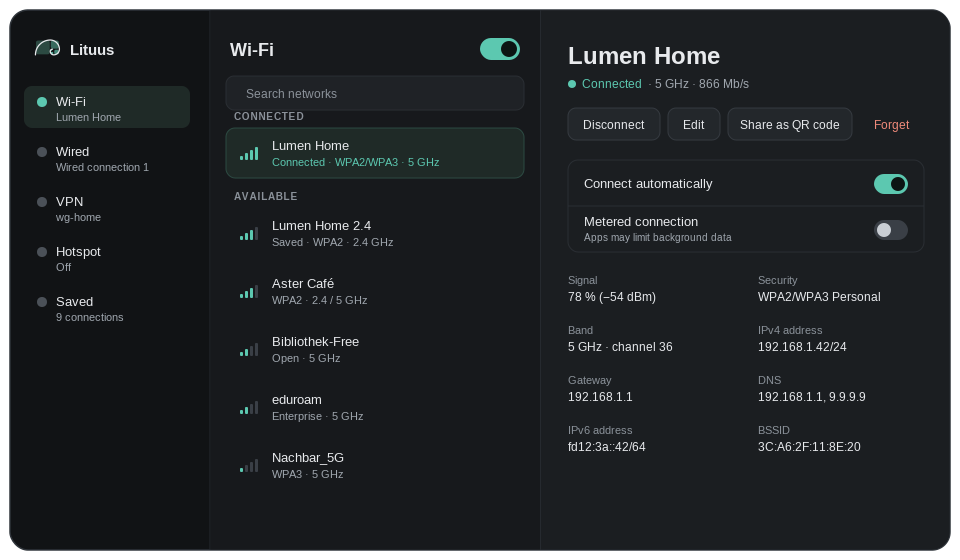
The settings app GNOME and KDE users take for granted, for the desktops that leave it to you.
Network
Wi-Fi, wired and VPNs: connect in a keystroke, and edit every setting, from WPA Enterprise to IPv6, DNS and routes. WireGuard and OpenVPN files, a hotspot, passwords in your keyring.
Bluetooth
Pairing with every kind of code, battery levels, headset audio, sending and receiving files, and a phone’s internet.
Sound
The output and input in use, a volume per app and where it plays, ports, balance and profiles, live with PipeWire.
Displays
Drag monitors into place, set modes, scale, HDR and VRR, and keep it or it goes back by itself. Workspaces on monitors, and profiles that switch when you plug in.
Your wallpaper's colours
Reads matugen palettes, ML4W’s included, and recolours itself live when you change wallpaper. Five built-in themes otherwise.
Made for Hyprland
A normal window with the class ch.giosuel.Lituus for window rules, keyboard-driven (Ctrl K finds any setting), with a tray icon and quick popup. Its own Hyprland file, never yours.
It uses what your system most likely runs already: NetworkManager, BlueZ, PipeWire and Hyprland.
From the AUR, as a .deb or .rpm, or as an AppImage, for x86-64 and ARM64. See Installing.
Pick a network, pair your headphones, place your monitors. Lituus picks up what you already have; for Displays, add one line to your config (see Displays).
Lituus is free and open source under the AGPL-3.0. Built with Rust and Slint, on top of NetworkManager, BlueZ, PipeWire and Hyprland.